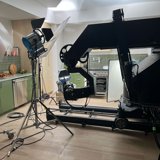
Motion control works with virtual production by sending a camera’s programmed movement data into the software driving a virtual environment. As the physical camera moves, the virtual camera follows, updating the perspective displayed on the LED wall.
For directors and agency producers, that connection opens up creative possibilities: precise camera moves through digital environments, matching shots across changing scenes, and coordinated movement between the camera, physical set, and virtual background.
At TRG Multimedia, Motion Control Operator Tim Smith and Virtual Production Supervisor Tyler Spicher work together to connect our MILO camera robot with our LED stage. We sat down with them to explain how the tools work together and when the combination makes sense.
What does a motion control camera robot actually do?
A motion control robot moves a camera along a programmed path, giving the operator precise control over its movement and timing. That path can then be repeated across multiple takes.
TRG’s MILO camera robot runs through software called Flare. Tim uses it to create and adjust movements that might be difficult to execute consistently with manually operated camera support.
“When you’re dealing with motion control, you have very precise, repeatable control over all of those aspects,” Tim explains.
That control supports everything from smooth macro shots of small products to larger, sweeping movements through a set. It also helps when separate takes need to line up for a transition or visual effect.
How does the virtual background follow the camera?
For a camera-tracked 3D environment, the virtual production system needs to know where the physical camera is moving so it can display the corresponding perspective on the LED wall.
In TRG’s MILO workflow, that information comes directly from the robot’s control software.
“The nice thing about the Milo is it knows exactly where it is in space, and it knows exactly where the camera is in space,” Tim says.
Movement data from Flare feeds into the virtual production workflow using Disguise and Unreal Engine. That allows the physical and virtual cameras to move together without relying on the stage’s separate optical tracking system for that setup.
Getting there requires coordination. Tim and Tyler align scale, orientation, timing, and offsets so the physical camera’s position translates correctly into the virtual environment.
Repeatable movement creates room for creative changes
When the camera can repeat a move consistently, the team can change other parts of the scene while preserving the movement connecting each take.
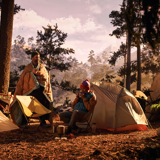
On a camping spec shoot at TRG, the team repeated a move across multiple days while changing the seasonal backgrounds. The footage could then be joined in the edit to create a continuous-looking camera move through changing environments.
Motion control can also coordinate with other programmable equipment. Tim and Tyler describe connecting a physical turntable with movement in the virtual environment to achieve shots beyond what the LED wall’s footprint would ordinarily allow.
Those shots depend on careful alignment between the physical and digital worlds, including matching their rotation points.
When is a dolly, jib, or static camera enough?
MILO makes sense when a shot benefits from precise timing, repeatability, complex movement, or coordination with other controlled equipment. Simpler shots may need a simpler setup.
“If it’s something that can be just achieved with a static camera or very small camera movements, then maybe a dolly or a traditional jib is the right move,” Tim explains.
The creative determines the equipment. Before filming, Tyler can use a digital model of the stage and MILO to test camera movements, angles, and the placement of physical scenery. That helps the team evaluate how a proposed shot will work within the available space.
Camera movement data can support post-production, too
The movement information used during filming can also be passed to visual effects artists or the CGI department for subsequent work.
As Tim explains, the team has data “that can then be handed on to the visual effects artist or the CGI department for any post-work.”
The handoff should be planned around what the post team needs. Recording precise movement data provides a useful foundation, while the finished result still depends on the shot’s requirements and execution.
For directors and producers, the starting point is the idea: what needs to move, what needs to match, and what needs to change? Answering those questions early helps TRG’s motion control and virtual production teams build the right approach around the shot.